AI Observation & Learning Crew for Early Childhood Educators
An educator speaks or types what happened. BloomKrew organises the evidence, proposes curriculum links, drafts the learning record and prepares next steps. The educator checks and approves.
BloomKrew · Observation captureVoice or typed note → educator confirmation
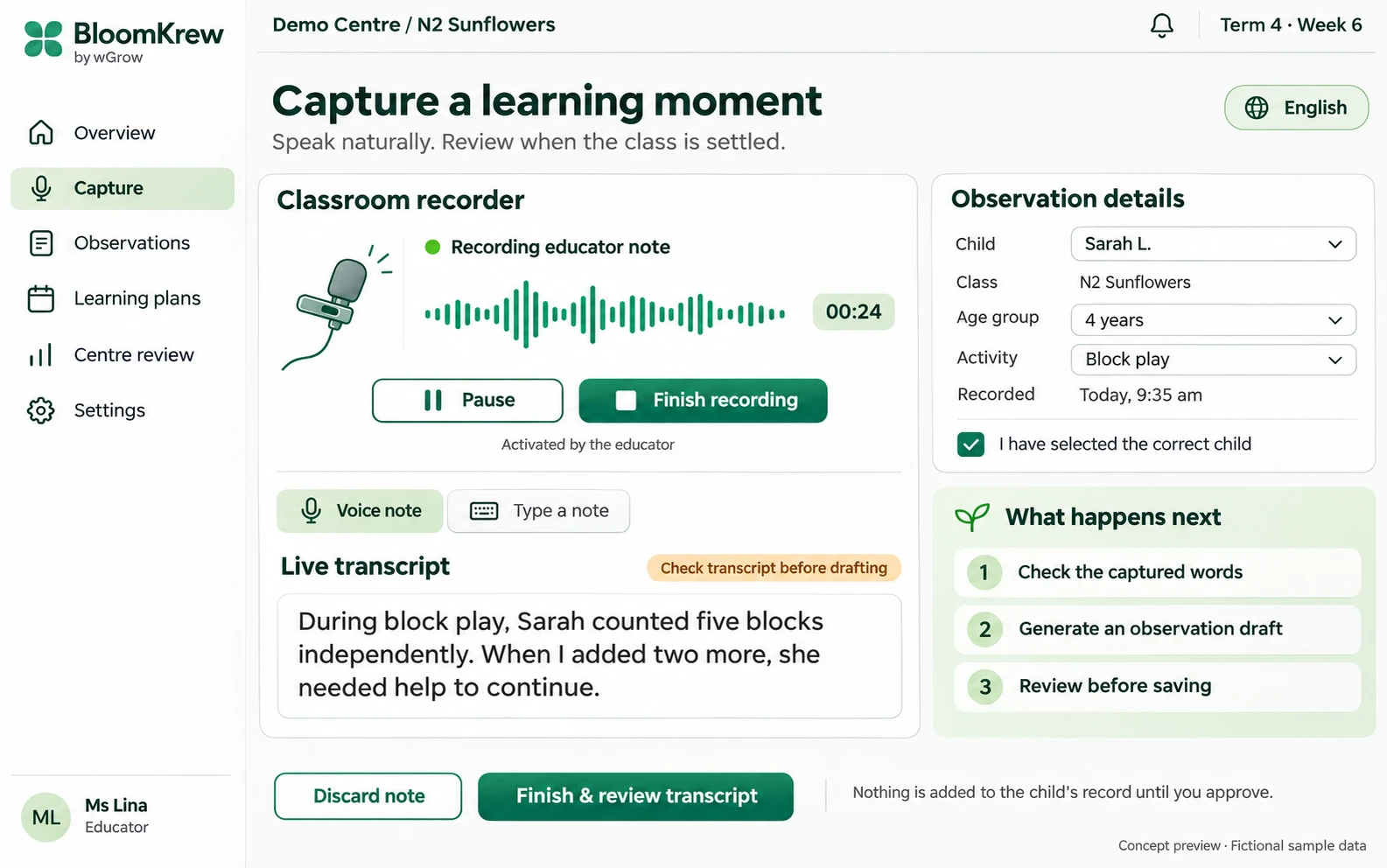
The educator initiates the note, checks the captured words and confirms the child. Nothing is finalised without review.
Evidence comes first
Keep the observation and its meaning connected.
The crew separates facts, interpretation and open questions. Every draft stays connected to the educator’s original account.
Illustrative example: an educator observes a child counting during block play.
One observation · three clear boundaries
Observed independently
The child counted five blocks independently.
Observed with support
When two more blocks were introduced, the child needed help to continue.
Still to establish
Counting other quantities or in other situations needs further observation.
“Not demonstrated here” must not become “the child cannot do it.”
Our Agentic Krew team setup
Six specialists. One shared observation. Human approval at the end.
Each agent has a bounded task and a clear handoff. They work from the same confirmed observation and record version. Facts, interpretations, references and approval states remain separate and traceable.
01
Observation Agent
Receives
Educator voice recordings or typed notes, with the selected child and classroom context.
Produces
Extracts the activity, observed actions, words spoken and assistance provided, and flags unclear or missing details.
Human control
The educator confirms the child, corrects the transcript and checks the factual evidence before drafting.
02
Curriculum Mapping Agent
Receives
Confirmed observation evidence, age and learning area, plus the approved EYDF/NEL reference set.
Produces
Retrieves candidate curriculum references and explains the evidence supporting each proposed learning link.
Human control
The educator accepts, changes or rejects each proposed mapping; a suggestion is not an automatic assessment.
03
Documentation Agent
Receives
The confirmed evidence, accepted learning links and the centre’s documentation template.
Produces
Prepares observation, learning areas, activity description, analysis and suggestions as an editable portfolio draft.
Human control
The educator edits the wording and interpretation and checks that the draft stays faithful to the original account.
04
Quality Review Agent
Receives
The proposed record, original evidence, curriculum references and the centre’s quality rules.
Produces
Flags unsupported claims, factual inconsistencies, missing information and wording that needs professional review.
Human control
The educator resolves concerns or requests revision before the record is approved.
05
Learning Follow-up Agent
Receives
An educator-approved observation, confirmed learning needs and relevant classroom context.
Produces
Suggests individual next steps, optional classroom or home-learning activities and questions for a subsequent observation.
Human control
The educator selects a suitable follow-up, adjusts support and records what actually happened afterwards.
06
Workflow Agent
Receives
Versioned evidence, proposed mappings, record drafts, review decisions and follow-up status.
Produces
Coordinates handoffs, revisions, review queues, approved versions and preparation for portfolio transfer.
Human control
Educators control saving and approval; Centre Leaders retain their required review and sign-off role.
↳
The workflow coordinates. Permissions decide authority.
The Workflow Agent routes tasks, revisions and review queues. Software rules enforce access and approval states. Agents prepare drafts and flag questions; educators control saving and final wording, with Centre Leader review where required.
How the crew works together
A visible chain from evidence to follow-up.
01
Capture & confirm
Educator checks the transcript, confirms the child and corrects the evidence.
02
Retrieve & map
Approved curriculum references support explained, candidate learning links.
03
Draft & check
The record is drafted, then independently checked against the evidence.
04
Review & approve
Educator resolves concerns and approves; Centre Leaders review where required.
05
Follow up
Agreed next steps lead to another observation and a clearer learning picture.
References travel with the interpretation.
Candidate learning links include the supporting observation and the approved curriculum reference. Educators see why a mapping was proposed and can change or reject it.
Review is separate from drafting.
The Quality Review Agent checks the write-up against the evidence for unsupported claims, gaps and professional tone. Unresolved points return to the educator.
Approval belongs to a version.
Corrections to the evidence, mappings or write-up create a revised draft for review. An approved record is prepared for the agreed portfolio handoff.
Inside BloomKrew
The educator’s view. The crew’s work. The Centre Leader’s oversight.
All six screens follow the observation and its next steps. Child details, classroom data and curriculum mappings shown are illustrative.
01 / 06
Educator dashboard
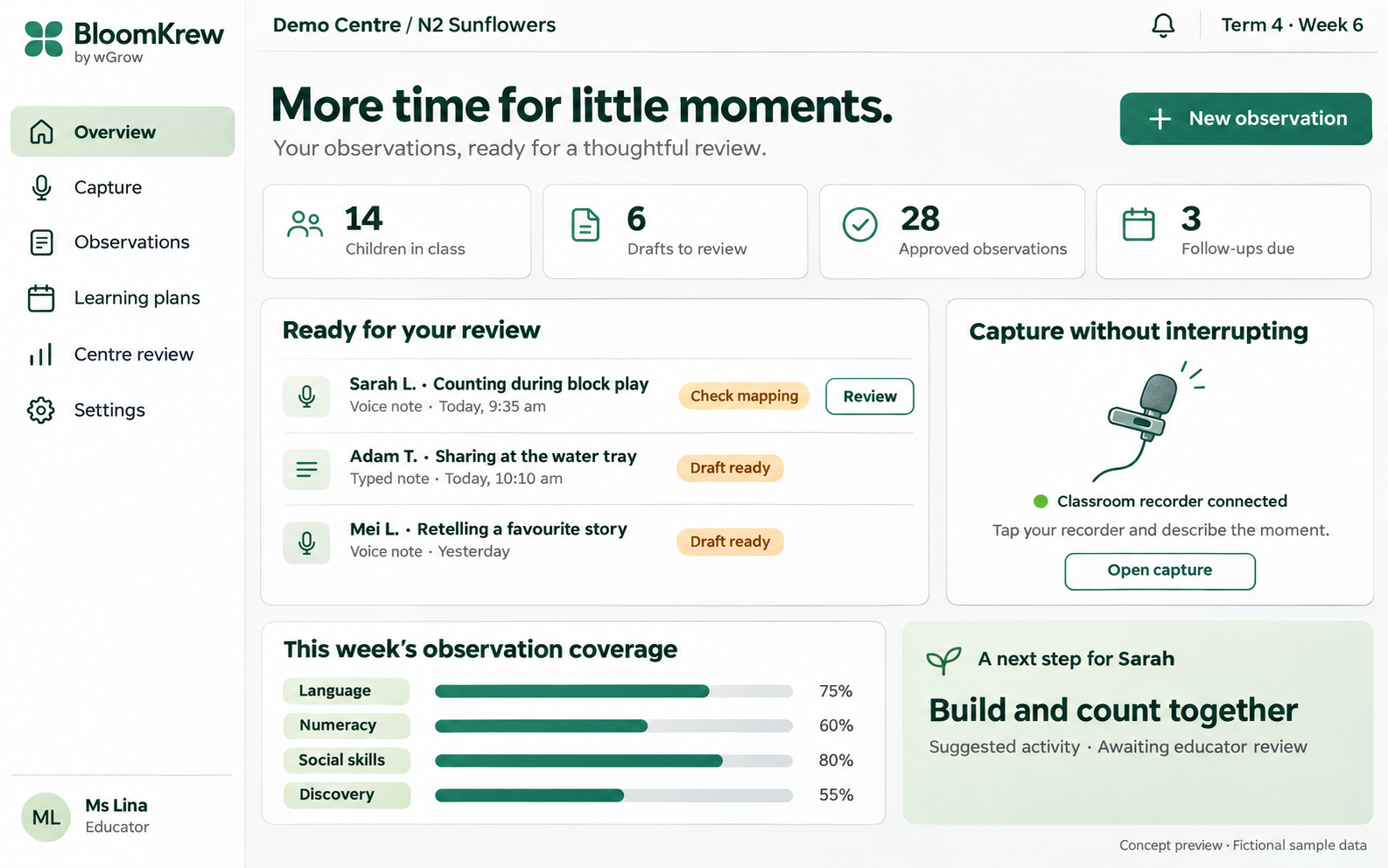
See observation drafts, review tasks, follow-ups and documentation coverage in one educator view. Capture a new note or return to a record awaiting confirmation.
Record an educator voice note or type an account of the learning moment. Confirm the child and classroom context, then check the captured words before generating a draft.
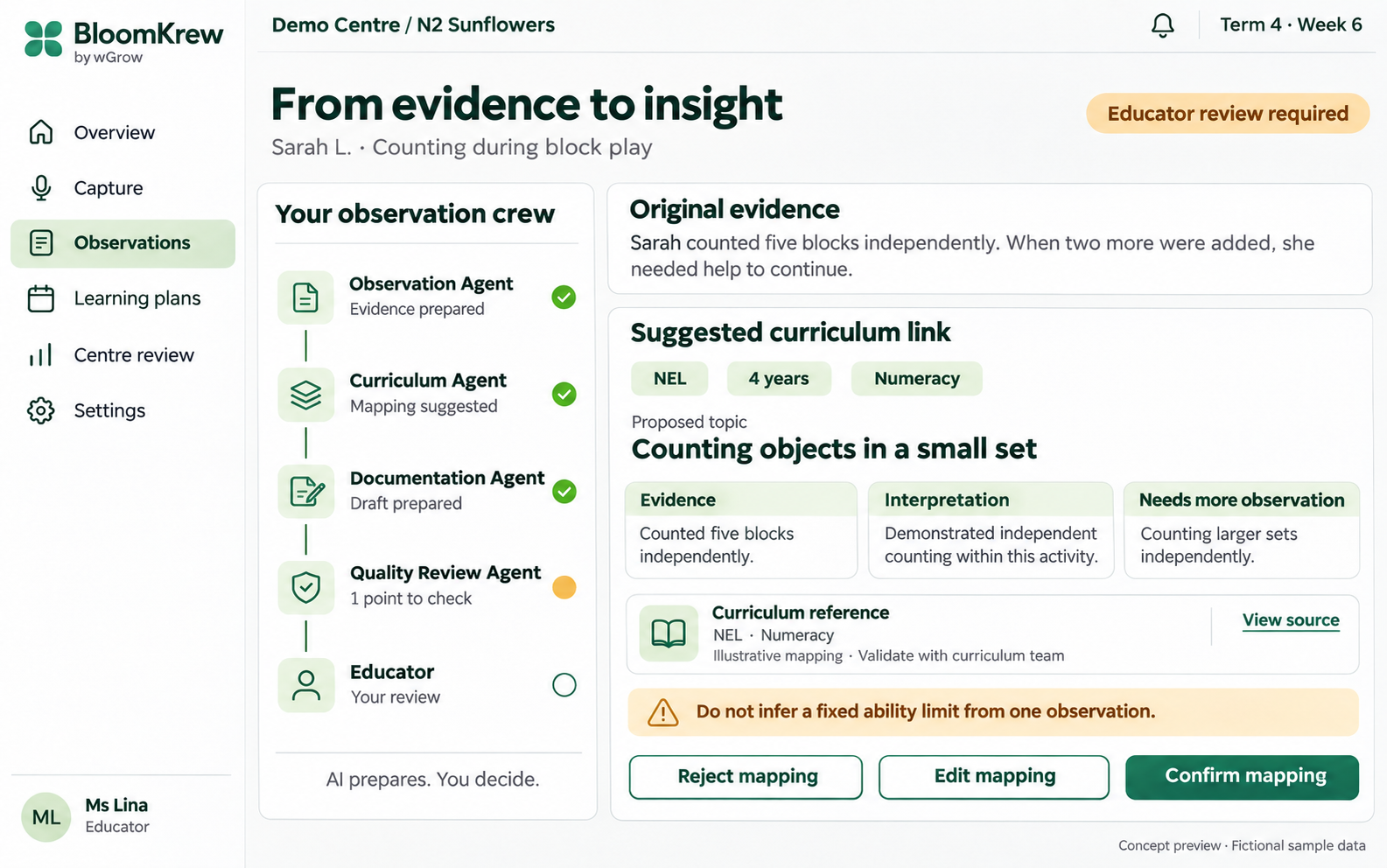
Follow the handoff from original evidence to a suggested curriculum link. Review the observation, proposed interpretation, supporting reference and questions that need more evidence before confirming a mapping.
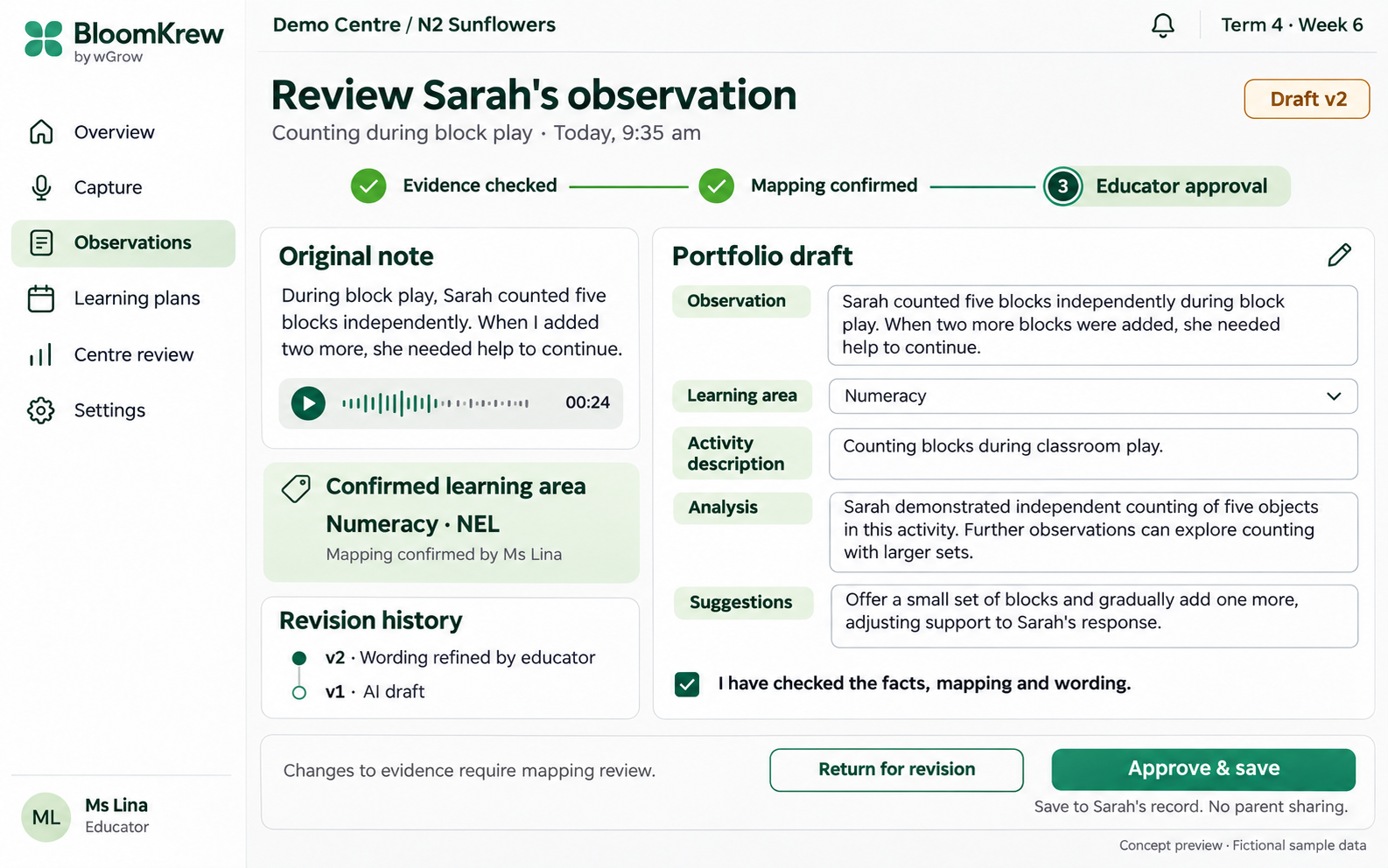
Compare the original account with the portfolio draft and confirmed learning area. Edit observation, activity description, analysis and suggestions, review version history, then approve or return the record for revision.
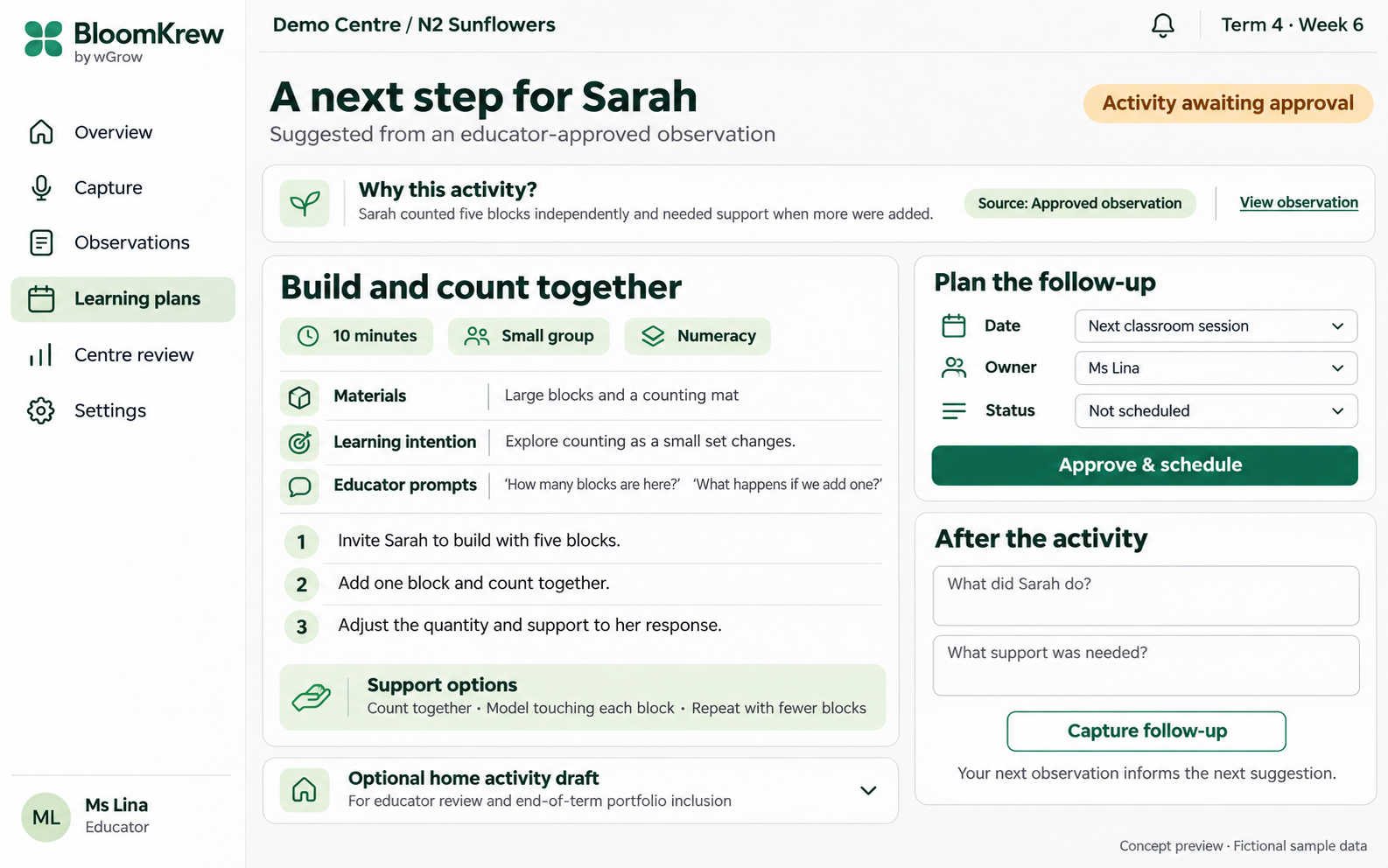
Review a next-step activity linked to an approved observation. Adjust materials, support and timing, then record what happened so the next suggestion is grounded in subsequent evidence.
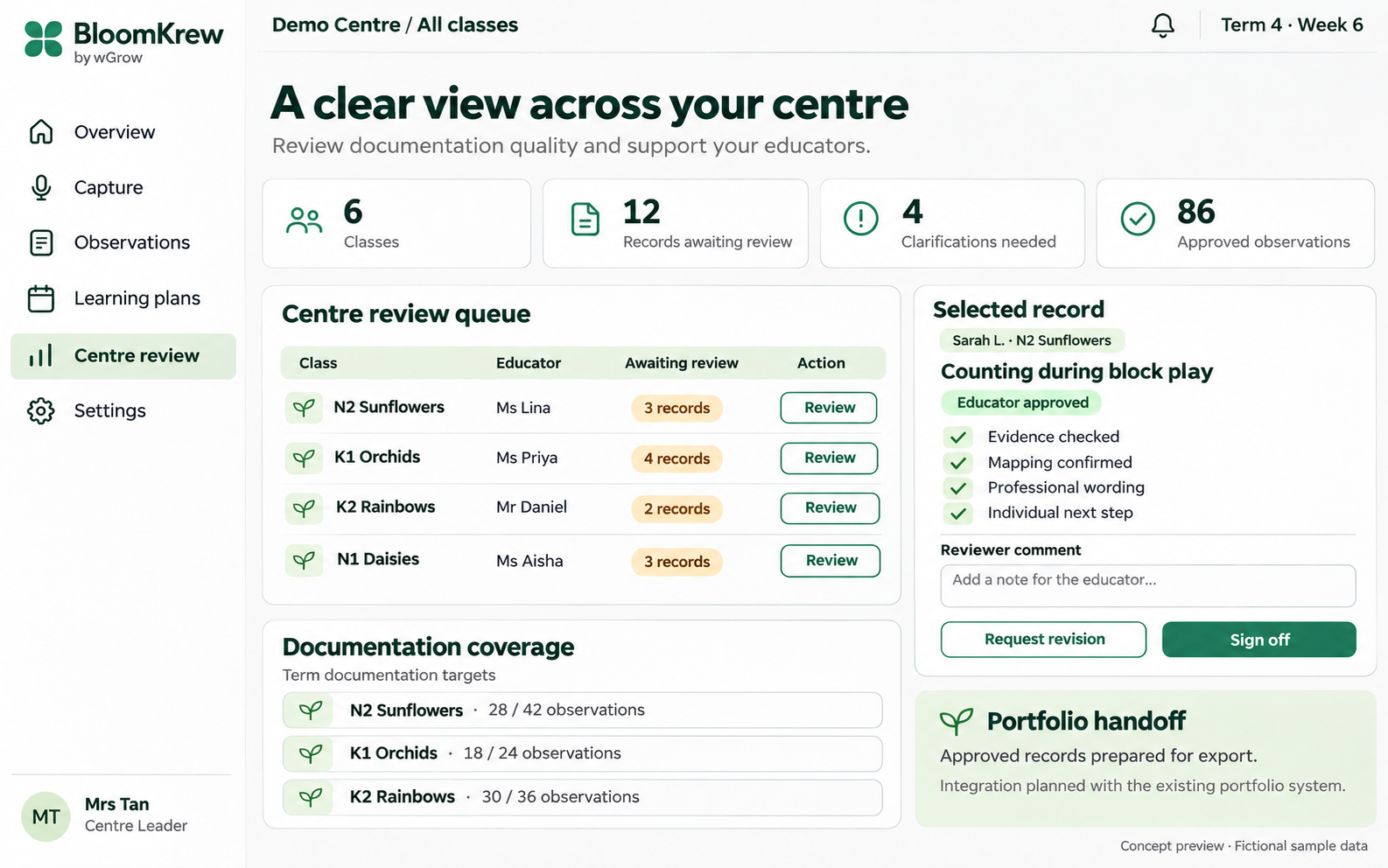
Review documentation across classes, resolve clarification requests and inspect approved records before sign-off. View coverage against documentation targets and prepare approved records for portfolio handoff.
Start with English voice or typed notes. Approved classroom devices and any clip-on recorder are scoped with your IT team and centre rules. Photo and video analysis are outside this observation workflow.
Centre-specific review and data controls
Configure class and centre access, review responsibilities, storage region, retention, encryption and audit history. Deployment requirements keep child observations out of model-training feedback; approved template and rule improvements are handled separately.
A defined portfolio handoff
Prepare approved, versioned records for export. The connection to your existing portfolio system is scoped with your team, including fields, permissions and who authorises transfer.
Two crews. A connected teaching cycle.
SproutKrew creates the activity. BloomKrew records the learning.
Before the lesson
SproutKrew
Creates activity plans, teaching materials, images, videos and rules under educator approval.
Confirmed observations can inform the next activity brief. The cross-system handoff is scoped as an integration, with educators deciding which evidence and next steps to carry forward.
Practical questions
Clear responsibilities. Clear review points.
What does BloomKrew capture?+
The educator’s account of what happened, spoken in English or entered as a typed note. The educator checks the transcript, confirms the child and corrects unclear details before a learning record is prepared. Capture is initiated by the educator, rather than continuous ambient classroom recording.
What is the Agentic Krew setup?+
Six specialists share a confirmed observation: Observation, Curriculum Mapping, Documentation, Quality Review, Learning Follow-up and Workflow. Each has a defined input, output and human checkpoint. The workflow coordinates handoffs, versions and review queues; software permissions and approval states control who can finalise a record.
How are curriculum mappings checked?+
The Curriculum Mapping Agent works from approved, version-controlled EYDF/NEL references for the selected age and learning area. It shows the evidence and rationale for a candidate mapping. Educators can confirm, edit or reject it. The illustrative mappings in the screenshots are not authoritative curriculum guidance.
Does one observation determine a child’s ability?+
No. The record distinguishes what the child did independently, what required support and what was not established by that observation. A missing demonstration must not become a claim that the child cannot do something. Educators decide whether more evidence is needed.
Does BloomKrew analyse children’s photos or videos?+
This workflow uses educator voice and typed observations. Photo and video capture or analysis are outside its scope. SproutKrew is the complementary activity and teaching-resource creation crew; its media creation has a different purpose.
Can records move into our portfolio system?+
BloomKrew prepares approved, versioned records for a portfolio handoff. The connection to your existing system is scoped with your IT team. The screenshots show that integration path; they do not establish that a particular portfolio connector is already installed.
How does deployment fit our centre’s data rules?+
We agree class and centre access, review roles, storage region, retention, encryption, audit history and model-provider handling with your team. Deployment requirements keep child observations out of model-training feedback. Approved template and rule changes improve the workflow separately.
Bring us your documentation workflow
Give every learning moment a careful documentation crew.
Tell us how educators capture observations, review learning records and maintain portfolios. We’ll map the crew, approval roles, curriculum sources and integration to your centre.