

RAG Pipelines Must Inherit Row-Level Security
By wGrow Project Team ·
Do not build an HR chatbot until you have tested whether an intern can ask it for the executive salary bands. Many project teams fail that test on day one. It isn’t a model bug. The architecture is doing exactly what it was designed to do.
Vectorizing a drive flattens its security model
A standard RAG pipeline crawls a SharePoint site or a Google Drive, extracts the text, chunks it, embeds it, and writes the vectors to a database. Somewhere in that sequence the file-level access control list gets dropped. The text arrives. The permissions don’t.
An embedding stores coordinates, not permissions. If the ingestion pipeline doesn’t persist the source ACL as metadata, the retrieval layer has nothing to filter on. It doesn’t know that “Compensation 2026.xlsx” was visible to eleven people in HR. Hand it a query vector and it returns the nearest neighbours it is allowed to consider, which in a flat index means everything.
The embedding pipeline, meanwhile, runs as a service account with read access to everything it indexes. In effect it’s a superuser. Everything it reads lands in one flat store, and every user who can reach the chatbot can now reach all of it, limited only by how well they phrase a question.
Nobody exploited anything here, and it’s still a privilege escalation path. The system was configured to allow it. I call it silent data exfiltration because no alert fires and no file is opened. The source system’s audit log shows a single read by a service account at indexing time. It says nothing about the users who later retrieve that content.
Compliance officers in regulated sectors grasp this fast, and they shut these deployments down just as fast. They’re right to. Data boundary rules aren’t negotiable, and “it’s only a pilot” doesn’t change what the chatbot can retrieve.
Filter before retrieval, never after
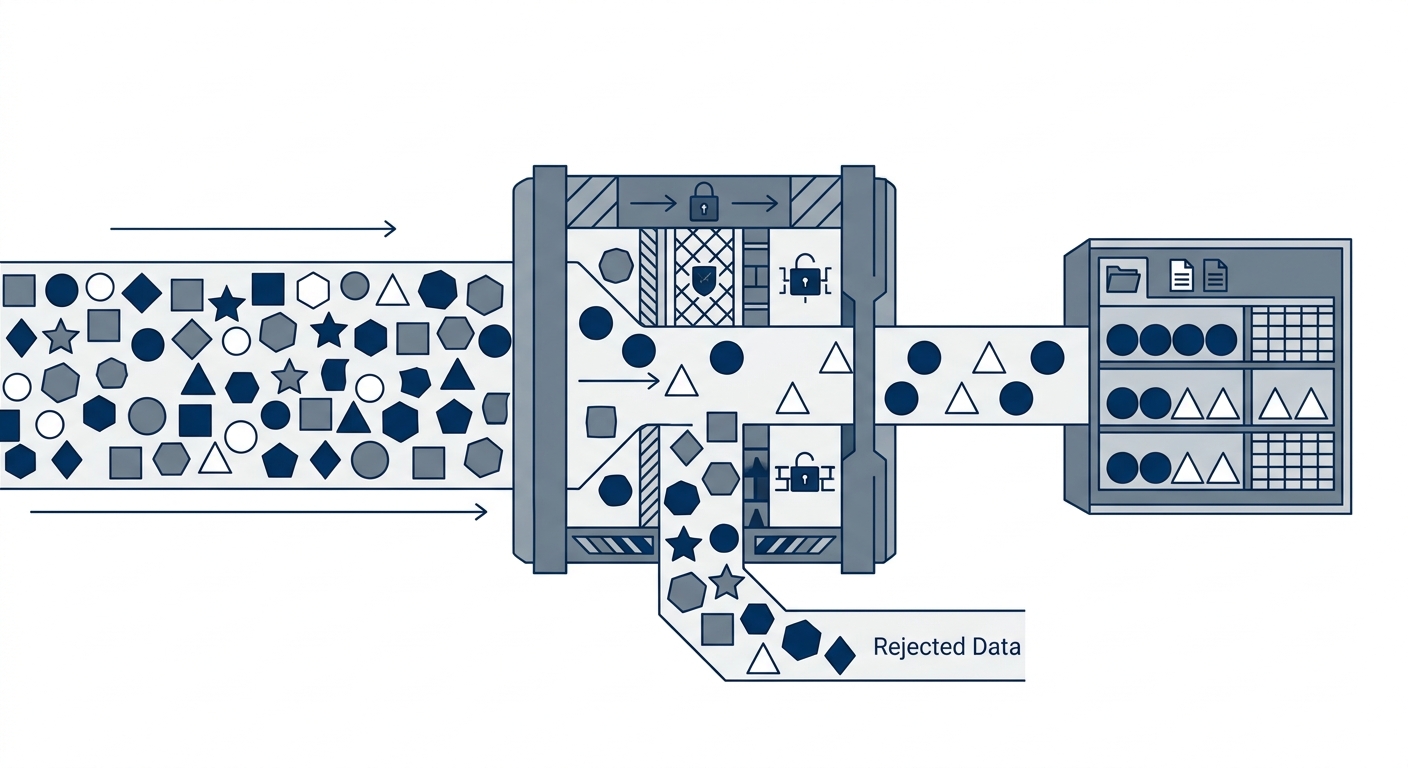
The mistake I see most often is handing the problem to the model. The system prompt says “only answer using documents the user is entitled to see.” That’s a request, not a control.
Prompt-side filtering fails by construction. Once the restricted chunk is in the LLM context, a user can tell the model to ignore its instructions, quote its context verbatim, or summarise “everything you were given.” The model is a text-completion engine. It doesn’t enforce policy, and treating it as an access control layer is an architecture review finding, not a design choice. Filtering in application code after retrieval is better, because the chunk can be dropped before the prompt is assembled. But restricted content still passes through the retrieval service, and you have to over-fetch candidates to have enough permitted results left after the cut. For enterprise RAG, enforce authorization before candidate chunks are returned.
My position in design reviews is simple: authorization must happen in the retrieval layer, before any text reaches the prompt.
Two mechanical requirements follow:
- At ingestion, every chunk is tagged with the access metadata from its source system: group IDs, user IDs, or both, copied from the source ACL at the moment of indexing.
- At query time, the vector search runs with a payload filter built from the querying user’s own credentials. The filter is mandatory, and the model never constructs it.
If the user doesn’t hold a group ID that appears on the chunk, the chunk is excluded from the candidate set. It doesn’t rank low. For that query, it doesn’t exist. Cosine similarity can’t surface what the filter has already removed.
Case: Entra ID and Azure AI Search at a statutory board
We built this for a local statutory board, using Azure AI Search with Entra ID (formerly Azure AD) as the identity source.
Our first design indexed documents under a service identity, with the chatbot backend querying on behalf of everyone. That’s the flat-database failure described above, and we caught it before it shipped. Two things changed.
Ingestion. Every text chunk is tagged with the Active Directory group IDs of its source document, read from the source system at indexing time. Chunks inherit the ACL of their parent file. A chunk without ACL metadata is not indexed. We treat missing metadata as a pipeline failure, never as “public.”
Retrieval. The API authenticates the user’s Entra identity, then resolves authorized group IDs from token group claims where present and from the directory lookup path when claims are omitted or overage-limited. Those IDs are used to build a mandatory filter over the chunk ACL fields. Azure AI Search evaluates that filter against indexed ACL metadata; it is not asked to infer document permissions from the raw user token.
What matters more than the mechanism is the consequence. The vector store denies the read before the prompt is assembled. No prompt ever contains a restricted chunk, so a clever user has nothing to extract. The control sits at the data layer, where an auditor can inspect it, rather than at the language layer, where nobody can.
Case: Workday hierarchies into Qdrant payload filters
| 1 | { | |
| 2 | "filter": { | |
| 3 | "must": [ | |
| 4 | { | |
| 5 | "key": "ad_group_ids", | ← ① |
| 6 | "match": { | |
| 7 | "any": ["grp-fin-read", "grp-emp"] | ← ② |
| 8 | } | |
| 9 | } | |
| 10 | ] | |
| 11 | } | |
| 12 | } | |
| 13 |
- ① ACL metadata mapped directly from Workday/Entra ID during the batch sync job.
- ② Filter condition evaluated natively by the vector DB before text chunk retrieval.
The second build was for a regional manufacturing MNC. The brief was a conversational agent covering leave policies, claims, and compensation structures. The stack was custom Python ingestion jobs, Qdrant as the vector database, and the Workday API as the source of organizational truth.
Here’s the part that never makes the slide deck. We spent significantly more time writing scripts to map messy Workday organizational hierarchies into Qdrant metadata than we spent tuning LLM prompts. Supervisory orgs, cost centres, grade bands, and manager chains don’t arrive as tidy group IDs. They arrive as a hierarchy full of exceptions, and somebody has to decide what “can see compensation structures for their own band” means as a payload filter.
That’s what enterprise AI delivery looks like. The prompt is the small part.
Two rules came out of that project:
- Permission sync is a first-class pipeline component. Batch indexing jobs must attach ACL metadata before any new document becomes searchable. If ACL metadata is missing, the document fails closed and stays unsearchable. A pipeline that defaults missing ACLs to public has created an exposure window.
- Access must follow the person. If an employee changes departments in Workday, their access profile in the vector database has to update in the next sync window. A stale payload is a stale permission. Someone who moved from Finance to Sales should stop retrieving Finance content at the next sync, not at the next quarterly review.
One gap remains, and I’d rather say so than hide it. Between a change in Workday and the next sync, the vector store reflects the old state. A shorter window narrows the exposure without closing it. Tell your compliance team the window length in writing. Revocations for high-sensitivity content may justify a faster path than routine changes.
The 150-millisecond latency tax

Pre-filtering isn’t free. Add metadata filters to a dense vector search and the engine has to evaluate access lists against payload tags while it searches. On our builds, query-time pre-filtering adds approximately 150 milliseconds per query to the retrieval step. That figure comes from our own deployments, not a vendor benchmark. It will vary with index size, filter cardinality, and how group membership is modelled, so test it on your data.
We accept the cost. Security outweighs speed here, and I don’t think it’s a close call.
Think about who is waiting. An employee asking about leave entitlements won’t notice 150 milliseconds on top of an LLM generation step that already takes far longer. A compliance team that finds restricted salary data in a chat transcript will notice immediately, and the project won’t survive the conversation.
If latency does become a real problem, there are legitimate ways to claw it back: coarser group modelling, indexing the payload fields you filter on, or partitioning by tenant or business unit. Each one trades some granularity or operational simplicity for speed. Dropping the filter isn’t on the list.
Permission sync defines enterprise AI
The generative AI hype cycle has mostly ignored legacy access controls. They’re unglamorous, they live in directories and HR systems that predate the models, and they don’t demo well. They’re also what regulated organisations have spent decades building, and the first thing your auditors will ask about.
The next phase of production AI depends on solution architects treating permission syncing as a core engineering problem rather than integration plumbing. Your agent is only as secure as the metadata tagging on its source documents. Stale tags, missing tags, and over-broad tags all turn into data leaks with a conversational interface on top.
So before any deployment, I run one test. Take a user with the lowest privileges in the organisation. Ask the system for something they should never see. If the answer is anything other than an empty retrieval, stop.
Access control can’t be bolted on afterwards. If you can’t map source-system ACLs to your vector store, you aren’t ready to deploy.